A camera like in a studio
Your camera, wherever the video needs it.
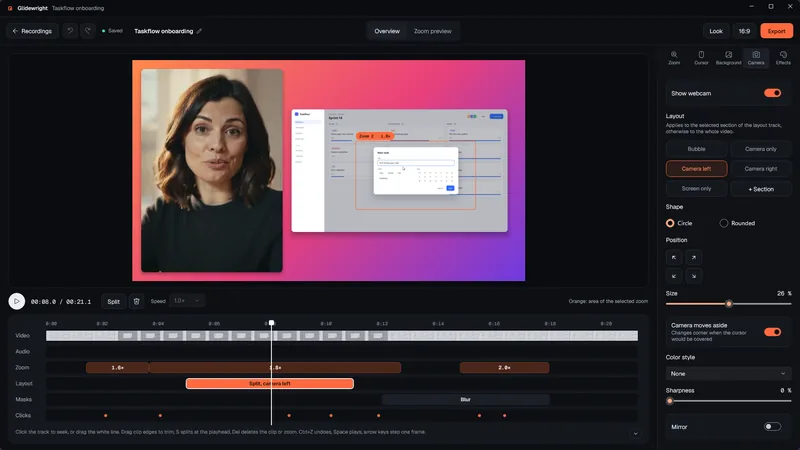
Start with your face, move to the screen, split both for the explanation. In Glidewright the layout belongs to a section of the video. Change it on the layout track, with a smooth transition.

How it works
- 1
Record with your webcam switched on. Camera and screen are stored as separate tracks.
- 2
In the Camera tab, choose the layout for the whole video: bubble, camera only, camera left, camera right or screen only.
- 3
Add a section at the playhead with “+ Section” and give it a different layout. Drag its edges on the layout track, split it with S, delete it with Del.
- 4
Layouts blend over 0.35 seconds, also across cuts. In portrait and square, split layouts stack on top of each other.
- 5
Pick a color style, sharpness and mirroring. They affect only the camera picture.
Good to know
Six color styles
Warm, cool, black and white, film, vivid and soft, plus none. They change the camera picture, not your screen.
Moves out of the way
If the cursor or a click target would end up under the bubble, it moves to another corner. It stays there for at least 2.5 seconds, so it doesn’t flutter.
Hide during silence
Optional, for projects with a microphone track: during pauses of at least 2 seconds the camera fades out.
Masks
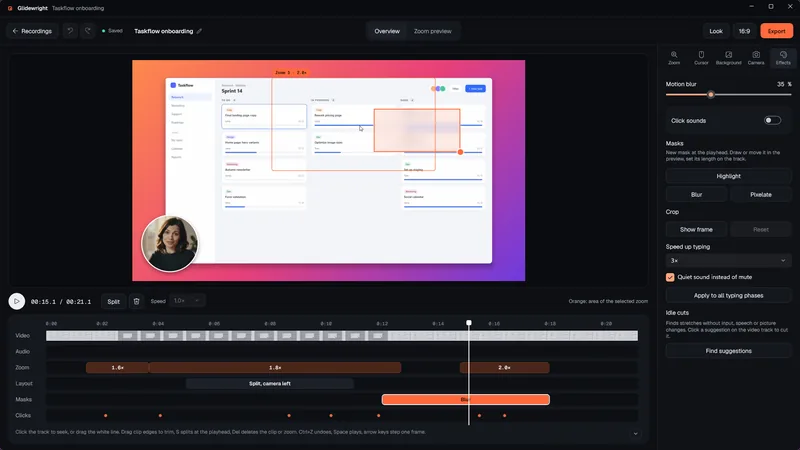
On a track of their own: highlight an area by darkening the rest, or make it unreadable with blur or pixelation. Masks stay fixed in the video picture.
Presets
Save layout, look, background, cursor and zoom strength as a preset, share it as a file or use it for new recordings.
FAQ
Questions
Do I need a webcam for this?
For the camera layouts, yes. Without a camera track, the layout track doesn’t appear, and masks and presets still work.
Does the camera picture leave my PC?
No. Recording, editing and export happen on your PC.
Can I hide sensitive data with a mask?
A blur or pixel mask makes the area very coarse, so fine text can no longer be read in the export. Cover the whole time span, because a mask only works while it runs, and check the export once. The original recording stays unchanged in your project folder. For real secrets, the safest way is not to record them at all.